Schedule these three programs using transaction SM36:
ABAP Program | Functionality | Recommended Frequency |
|---|---|---|
Check RFC connections to the Monitored Systems and NR API endpoints | Every 3 minutes | |
Data Collection, Multiple jobs should be scheduled based on connected systems and data providers | Every 5 minutes | |
Re-submit failed transmissions | Every 15 minutes |
Schedule RFC check program
Schedule /NEWR/REGISTRY_RFC_CHECK every 1 to 3 minutes, ensuring it runs more frequently than the data collection job. Use the job name NR_RFC_CHECK.
Schedule ABAP data collection manager
Schedule three data collection jobs with variants focused on the following data provider groups. For instructions on scheduling collection manager jobs before SP03, see Variants and Jobs before SP03. Separate data providers into three groups for scheduling. For a complete list of all data providers, see the Data Providers Reference.
- TRACE group includes performance database (STAD) related data providers:
NR.SAP.TRANSACTION: Trace data providerNR.SAP.TRANSACTION.COMPLETE: Complete performance database collection with parallel background RFC processNR.SAP.SYSTEM.PROCESSandNR_SAP_PROGRAM: Suspended after SP02NR_SAP_WORKLOAD_COMPLETEandNR.SAP.WORKLOAD.COMPLETE
- IDOC group includes IDOC-related providers (may take significant time in production):
NR_SAP_IDOC: Main IDOC status event data providerNR_SAP_IDOC_COMPLETE: Complete IDOC retrieval with background RFC collectionNR_SAP_IDOC_Configuration: Download IDOC master data to improve performance
- SYSTEM group includes all remaining data providers. See the complete list by monitoring group.
Create variants for /NEWR/ONE_COLLECTION
Starting from SP03, /NEWR/ABAP_COLLECTION_MANAGERN and RSBTONEJOB2 are combined into /NEWR/ONE_COLLECTION. This program includes all parameters from /NEWR/ABAP_COLLECTION_MANAGERN and job names from RSBTONEJOB2, functioning similarly. To schedule jobs, create variants for /NEWR/ONE_COLLECTION using the following values:
Variant Name | TRACE | IDOC | SYSTEM |
|---|---|---|---|
Job Name |
|
|
|
New Relic Account ID | SAP Account used to receive data | SAP Account used to receive data | SAP Account used to receive data |
Records per Trans | Default to 10000 | Default to 10000 | Default to 10000 |
Data Provider Name | Select Single Values:
| Select Single Values:
| Exclude Single Values:
|
Execution Mode | Sequential Processing | Sequential Processing | Parallel Processing |
Min WP Required | If system DIA WP >= 30, set to 6; otherwise set to 3. | N/A | If system DIA WP >= 30, set to 6; otherwise set to 3. |
Schedule collection jobs
Use transaction SM36 to schedule three collection jobs with the following configuration:
Job Name |
|
|
|
|---|---|---|---|
Program |
|
|
|
Variant | TRACE | IDOC | SYSTEM |
Running Freq | Every 5 minutes | Every 5 minutes | Every 5 minutes |
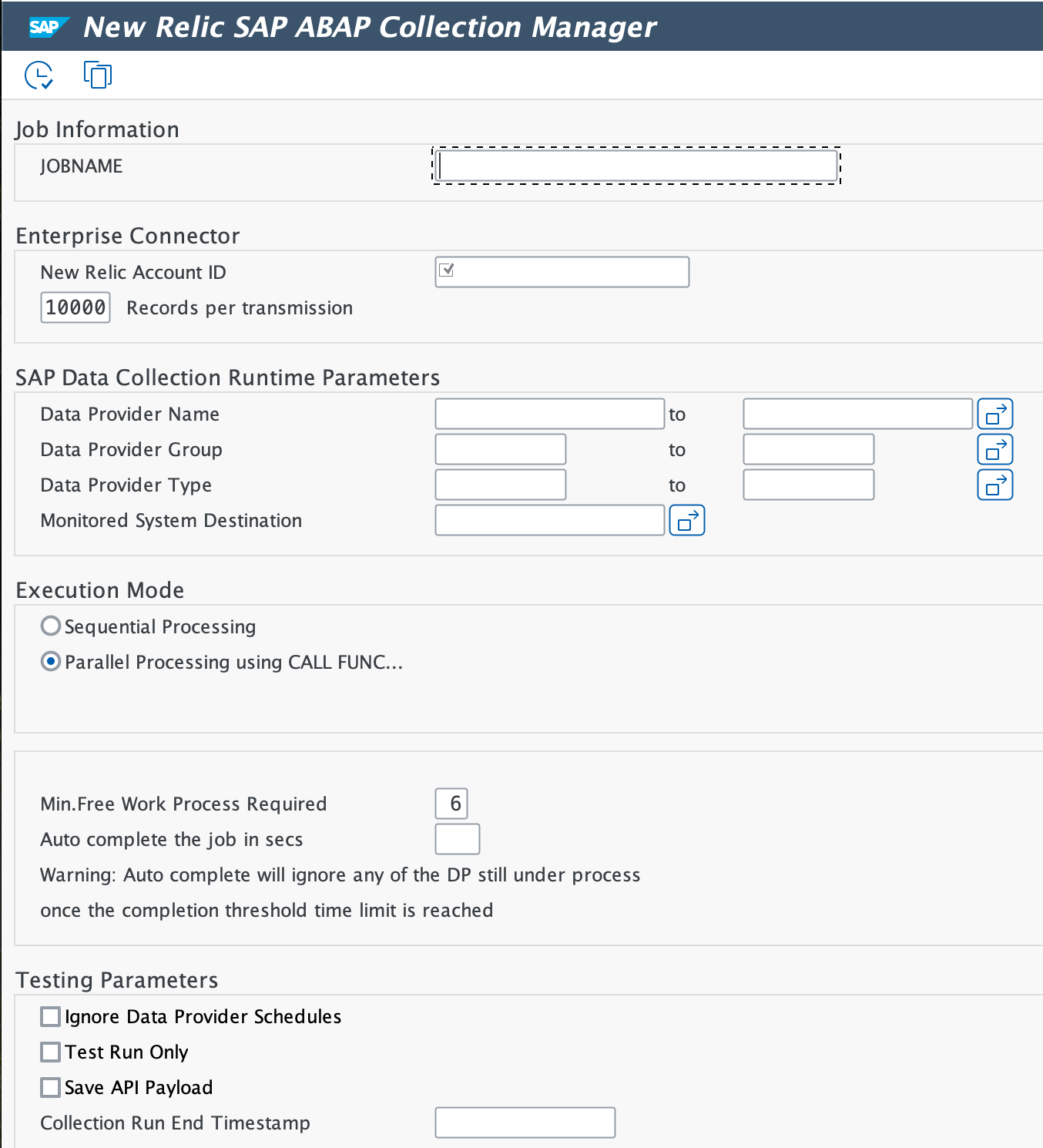
Schedule each job
- Start transaction
SM36. - Enter the Job Name for each job and set the Job Class to C.
- Click Step, enter the Program Name
/NEWR/ONE_COLLECTION, and select the Variant. - Click Start Condition, set the Start Date and Time, and check the Periodic Job box.
- Go to Period Values, click Other Period, and enter 5 for minutes.
Schedule resubmit program
Create a variant named DEFAULT for the program
/NEWR/RESEND_FAILED_API_TRANSto resubmit failed transmissions for the New Relic account in case of a transmission error.Specify the following values:
HTTP Response Codes: Exclude
000and413, and the range200to299.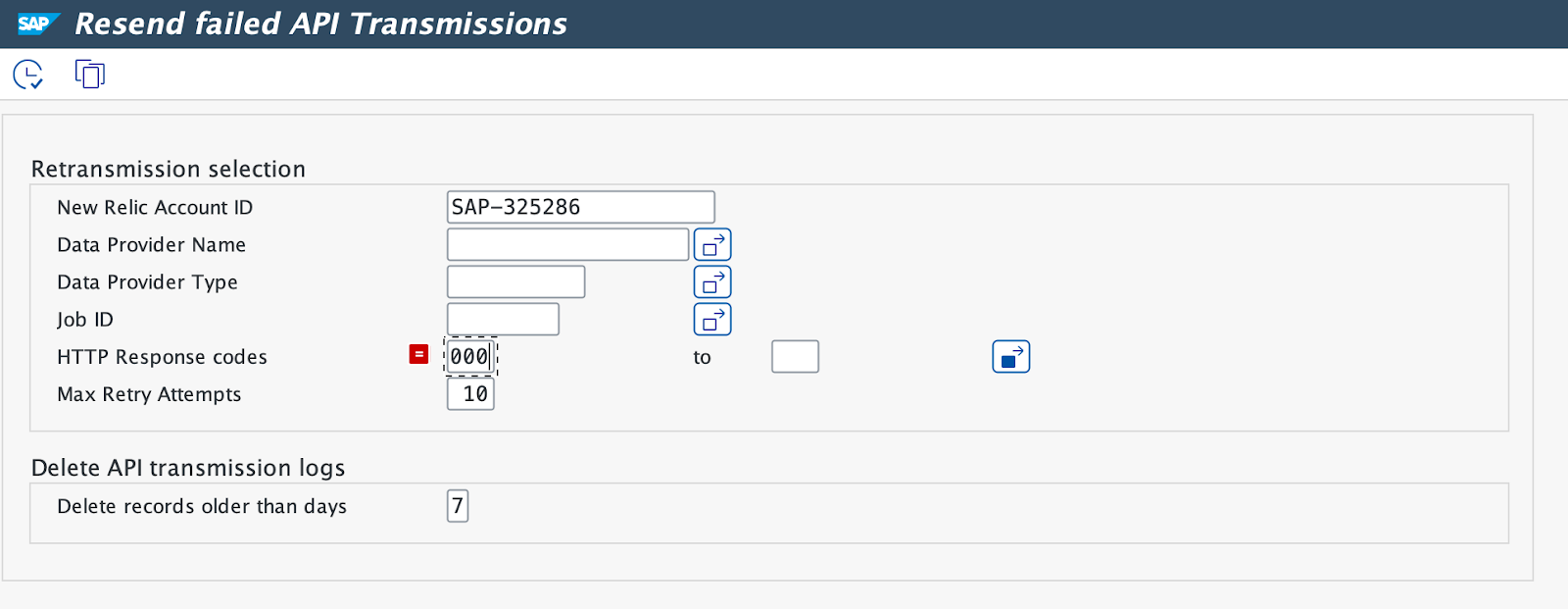
Schedule this job to run every 15 minutes to resubmit failed transmissions, such as those with HTTP response code
500, and periodically purge transmission log entries.