You can send telemetry data from your AWS Virtual Private Cloud (VPC) to New Relic via AWS PrivateLink.
Overview
Sending your New Relic data via AWS PrivateLink can:
- Reduce your AWS egress costs
- Improve security by keeping your data within the Amazon network
PrivateLink works for sending telemetry data to a variety of New Relic endpoints. It can't be used for our NerdGraph API or other non-ingest APIs.
To use this feature, you'll need to configure an interface endpoint in your VPC that your local New Relic agents and integrations will use to route data to New Relic via AWS PrivateLink.
Requirements
PrivateLink requires the New Relic Data Plus option. If you attempt to send data without Data Plus, traffic sent via PrivateLink will be rejected and returned with a 402 error.
Supported regions and zones
New Relic exposes AWS PrivateLink endpoints for the following:
Region | Zone |
|---|---|
|
|
|
|
|
|
|
|
|
|
An endpoint service is available only in the region where it was created (see the Amazon docs), and it can be accessed from other regions using inter-region peering or leveraging (Cross-Region Connectivity for AWS PrivateLink).
With VPC peering and Cross Region connectivity please note the customer is responsible for data transfer costs between regions.
This means that if your VPC is in one of the supported regions (us-east-1, us-east-2, or us-west-2 for US accounts; eu-central-1 for EU accounts; ap-northeast-1 for JP accounts), you only need to create the necessary internal VPC endpoint, as described below. If your VPC is in a region outside of the supported regions, we recommend using Cross-Region Connectivity for AWS PrivateLink or you can set up a peering connection.
The endpoints
These are the New Relic endpoint services available via AWS PrivateLink:
Data source | Hostname(s) | Endpoint service name(s) |
|---|---|---|
APM |
|
|
Event API |
|
|
Metric API (including Prometheus and other integrations) |
|
|
Logging |
|
|
Distributed tracing |
|
|
AWS Lambda and Cloudwatch Logs monitoring |
|
|
Infrastructure monitoring and on-host integrations |
|
|
|
| |
OpenTelemetry |
|
|
New Relic REST API |
|
|
Synthetics job manager |
|
|
Important
The endpoint services for api.newrelic.com, identity-api.newrelic.com, infrastructure-command-api.newrelic.com, and synthetics-horde.nr-data.net do not have associated DNS private names.
- To configure access to these services, create a PrivateLink connection to each service endpoint.
- For each hostname listed above, create a corresponding Private Hosted Zone (PHZ).
Data source | Hostname(s) | Endpoint service name |
|---|---|---|
APM |
|
|
Event API |
|
|
Metric API (including Prometheus and other integrations) |
|
|
Logging |
|
|
Distributed tracing |
|
|
AWS Lambda and Cloudwatch Logs monitoring |
|
|
Infrastructure monitoring and on-host integrations |
|
|
|
| |
OpenTelemetry |
|
|
New Relic REST API |
|
|
Synthetics job manager |
|
|
Important
The endpoint services for api.newrelic.com, identity-api.newrelic.com, infrastructure-command-api.newrelic.com, and synthetics-horde.nr-data.net do not have associated DNS private names.
- To configure access to these services, create a PrivateLink connection to each service endpoint.
- For each hostname listed above, create a corresponding Private Hosted Zone (PHZ).
Data source | Hostname(s) | Endpoint service name |
|---|---|---|
APM |
|
|
Event API |
|
|
Metric API (including Prometheus and other integrations) |
|
|
Logging |
|
|
Distributed tracing |
|
|
AWS Lambda and Cloudwatch Logs monitoring |
|
|
Infrastructure monitoring and on-host integrations |
|
|
|
| |
OpenTelemetry |
|
|
New Relic REST API |
|
|
Synthetics job manager |
|
|
Important
The endpoint services for api.newrelic.com, identity-api.newrelic.com, infrastructure-command-api.newrelic.com, and synthetics-horde.nr-data.net do not have associated DNS private names.
- To configure access to these services, create a PrivateLink connection to each service endpoint.
- For each hostname listed above, create a corresponding Private Hosted Zone (PHZ).
Data source | Hostname(s) | Endpoint service name |
|---|---|---|
APM |
|
|
Event API |
|
|
Metric API (including Prometheus and other integrations) |
|
|
Logging |
|
|
Distributed tracing |
|
|
AWS Lambda and Cloudwatch Logs monitoring |
|
|
Infrastructure monitoring and on-host integrations |
|
|
|
| |
OpenTelemetry |
|
|
New Relic REST API |
|
|
Synthetics job manager |
|
|
Important
The endpoint services for api.eu.newrelic.com, identity-api.eu.newrelic.com, infrastructure-command-api.eu.newrelic.com, and synthetics-horde.eu01.nr-data.net do not have associated DNS private names.
- To configure access to these services, create a PrivateLink connection to each service endpoint.
- For each hostname listed above, create a corresponding Private Hosted Zone (PHZ).
Data source | Hostname(s) | Endpoint service name |
|---|---|---|
APM |
|
|
Event API |
|
|
Metric API (including Prometheus and other integrations) |
|
|
Logging |
|
|
Distributed tracing |
|
|
AWS Lambda and Cloudwatch Logs monitoring |
|
|
Infrastructure monitoring and on-host integrations |
|
|
|
| |
OpenTelemetry |
|
|
Browser monitoring |
|
|
AWS API |
|
|
Important
The endpoint services for identity-api.jp.newrelic.com and infrastructure-command-api.jp.newrelic.com do not have associated DNS private names.
- To configure access to these services, create a PrivateLink connection to each service endpoint.
- For each hostname listed above, create a corresponding Private Hosted Zone (PHZ).
Tip
Endpoints are not yet available for:
- FedRAMP data
- New Relic Infinite Tracing
- Syslog TCP traffic
CloudWatch Metric Streams
Create VPC endpoints
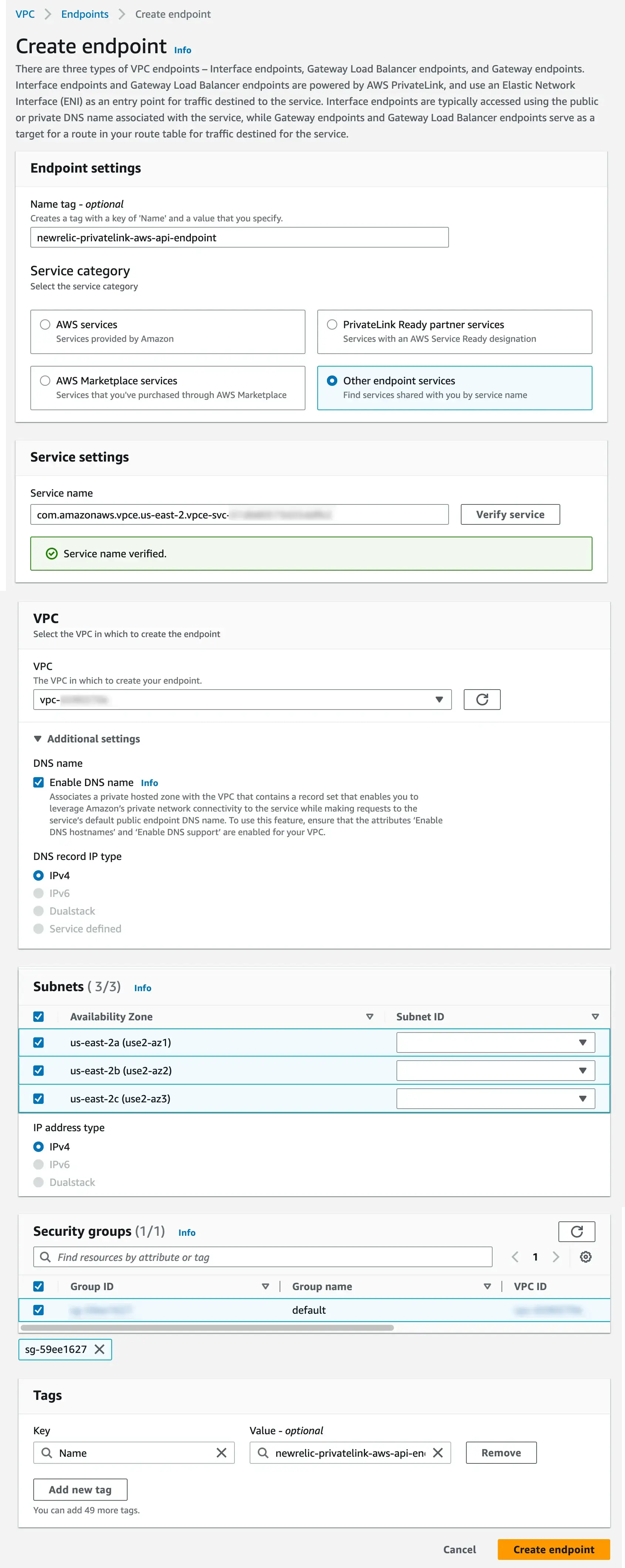
For each of the New Relic endpoint services you're using from the table above, create and attach a VPC endpoint within your VPC. When creating these endpoints, you'll need to configure the VPC subnets and security groups corresponding to the availability zones that New Relic has configured with the endpoint service.
Use the table and screenshot below as a guide to create and attach the VPC endpoint:
Field | Description |
|---|---|
Name tag | Optional. |
Service category | Select Other endpoint services. |
Service settings | For Service name, find the value in the table and click Verify. |
VPC | Select the VPC from the dropdown. |
Additional settings | Select the following:
|
Subnets | Select the zones. For IP address type, select IPv4. |
Security groups | Select the Group ID. |
Tags | Insert optional key/value pairs. |
Here's a screenshot of some sample settings:
Cross-region connectivity
New Relic supports AWS PrivateLink Cross-Region Connectivity, which allows you to connect to New Relic endpoints from any AWS region without setting up VPC peering. This is the recommended approach when your VPC is in a region outside the ones listed in Supported regions and zones.
Cross-region connectivity is supported from all AWS regions for New Relic's US, EU, and JP data center endpoints, except ap-southeast-6 (New Zealand) and ap-east-2 (Taipei).
Set up a peering connection
VPC peering is no longer required to connect from regions outside the supported regions. We recommend using Cross-Region Connectivity for AWS PrivateLink instead. If you still prefer to use VPC peering, note that data transfer costs between regions are your responsibility.
VPC peering
Follow the instructions to create inter-region VPC peering connections, specifying the VPC ID of the endpoint connections you created.
Transit Gateway peering
Follow the instructions to create a Route 53 PHZ and share it between VPCs, specifying the VPC ID of the endpoint connections you created.