このページでは、ワークフロー自動化アクション カタログで使用できる AWS Systems Manager アクションの包括的なリファレンスを提供します。これらのアクションにより、システム管理の自動化と操作の文書化が可能になります。
前提条件
ワークフロー自動化で AWS アクションを使用する前に、次の点を確認してください。
- 適切な権限を持つ AWS アカウント。
- 設定された AWS 認証情報 (IAM ユーザー認証情報、IAM ロール ARN、またはセッション認証情報)。
- 使用する予定の特定のAWSサービスに必要な IAM 権限。
IAM ユーザーおよび IAM ロールを作成する方法、およびワークフロー オートメーションAWSアクションと統合するための静的 AWS 認証情報とセッションAWS認証情報を設定する方法については、「 AWS認証情報のセットアップ」を参照してください。
アクション入力で渡された AWS 認証情報に基づいて、SSM ドキュメントをAWSアカウントに書き込みます。 AWS Systems Manager のドキュメントを参照してください
入力フィールド | オプション性 | タイプ | 例 |
|---|---|---|---|
awsRoleArn | オプション | 弦 |
|
awsAccessKeyId | オプション | 弦 |
|
awsSecretAccessKey | オプション | 弦 |
|
awsSessionToken | オプション | 弦 |
|
リージョン | 必須 | 弦 |
|
documentName | 必須 | 弦 |
|
documentType | オプション | 弦 |
ここから有効な値を確認してください。 |
documentFormat | オプション | 弦 |
ここから有効な値を確認してください。 |
documentContent | 必須 | 弦 | 例を確認する |
override | オプション | ブール値 |
|
セレクター | オプション | リスト |
|
出力フィールド | タイプ | 説明と例 |
|---|---|---|
documentName | 弦 |
|
documentVersion | 弦 |
|
documentType | 弦 |
|
documentStatus | 弦 |
値はここからのステータスのいずれかになります。 |
成功 | ブール値 |
|
エラーメッセージ | 弦 |
|
重要
- アクション入力では、
awsAccessKeyIdとawsSecretAccessKeyのみを指定できますが、これらは IAM ユーザーの静的認証情報である必要があります。 - セッション資格情報を使用する場合は、
awsAccessKeyId、awsSecretAccessKey、およびawsSessionTokenアクション入力に渡す必要があります。 - 指定された唯一のものを出力として取得するセレクター。
- 手順については、 AWS 認証情報を参照してください。
例 1 : すべての Lambda関数をリストする単純な SSM ドキュメント
schemaVersion: '0.3' description: List all Lambda function names. mainSteps: - name: ExecuteAwsApi action: aws:executeAwsApi isEnd: true inputs: Service: lambda Api: ListFunctions outputs: - Name: resultFunctionName Selector: $..FunctionName Type: StringList outputs: - ExecuteAwsApi.resultFunctionNameSSM リストによる完全なオートフロー定義 Lambda関数
name: aws-api
  workflowInputs:    key:      type: String      defaultValue: "${{ :secrets:11933347:USERNAME_AWS_ACCESS_KEY_ID }}"    access:      type: String      defaultValue: "${{ :secrets:11933347:USERNAME_AWS_SECRET_ACCESS_KEY }}"    token:      type: String      defaultValue: "${{ :secrets:11933347:USERNAME_AWS_SESSION_TOKEN }}"    region:      type: String      defaultValue: us-east-2
  steps:    - name: createSsmDocument      type: action      action: aws.systemsManager.writeDocument      version: 1      inputs:        awsAccessKeyId: ${{ .workflowInputs.key }}        awsSecretAccessKey: ${{ .workflowInputs.access }}        awsSessionToken: ${{ .workflowInputs.token }}        region: ${{ .workflowInputs.region }}        selectors:          - name: documentName            expression: '.documentName'          - name: documentType            expression: '.documentType'          - name: documentStatus            expression: '.documentStatus'          - name: success            expression: '.success'        documentName: "LambdaListFunctionNames"        documentContent: |          schemaVersion: '0.3'          description: List all Lambda function names.          mainSteps:            - name: ExecuteAwsApi              action: aws:executeAwsApi              isEnd: true              inputs:                Service: lambda                Api: ListFunctions              outputs:                - Name: resultFunctionName                  Selector: $..FunctionName                  Type: StringList          outputs:            - ExecuteAwsApi.resultFunctionName
    - name: generateIdempotencyToken      type: action      action: utils.uuid.generate      version: 1
    - name: start1      type: action      action: aws.systemsManager.startAutomation      version: 1      inputs:        awsAccessKeyId: ${{ .workflowInputs.key }}        awsSecretAccessKey: ${{ .workflowInputs.access }}        awsSessionToken: ${{ .workflowInputs.token }}        region: ${{ .workflowInputs.region }}        documentName: "${{ .steps.createSsmDocument.outputs.documentName }}"        idempotencyToken: ${{ .steps.generateIdempotencyToken.outputs.uuid }}
    - name: waitForCompletion      type: action      action: aws.systemsManager.waitForAutomationStatus      version: 1      inputs:        awsAccessKeyId: ${{ .workflowInputs.key }}        awsSecretAccessKey: ${{ .workflowInputs.access }}        awsSessionToken: ${{ .workflowInputs.token }}        region: ${{ .workflowInputs.region }}        automationExecutionId: ${{ .steps.start1.outputs.automationExecutionId }}        # Optional, default is Success and Failed        automationExecutionStatuses:          - "Success"          - "Failed"        timeout: 60
    - name: hasCompleted      type: switch      switch:        - condition: ${{ .steps.waitForCompletion.outputs.automationExecutionStatus == "Failed" }}          next: displayError        - condition: ${{ .steps.waitForCompletion.outputs.automationExecutionStatus == "Success" }}          next: displaySuccess      next: displayUnexpected
    - name: displayUnexpected      type: action      action: newrelic.instrumentation.log      version: 1      inputs:        message: "Unexpected status ${{ .steps.waitForCompletion.outputs.automationExecutionStatus | tojson }}"      next: cleanupSsmDocument
    - name: displaySuccess      type: action      action: newrelic.instrumentation.log      version: 1      inputs:        message: "This is all the lambda function names on the region ${{ .workflowInputs.region }}:${{ .steps.waitForCompletion.outputs.automationExecutionOutputs.ExecuteAwsApi.resultFunctionName | join(\",\") }}"      next: cleanupSsmDocument
    - name: displayError      type: action      action: newrelic.instrumentation.log      version: 1      inputs:        message: "Error while executing document ${{ .steps.createSsmDocument.outputs.documentName }}, detail: ${{ .steps.waitForCompletion.outputs.errorMessage }}"      next: cleanupSsmDocument
- name: cleanupSsmDocument type: action action: aws.systemsManager.deleteDocument version: 1 inputs: awsAccessKeyId: ${{ .workflowInputs.key }} awsSecretAccessKey: ${{ .workflowInputs.access }} awsSessionToken: ${{ .workflowInputs.token }} region: ${{ .workflowInputs.region }} documentName: ${{ .steps.createSsmDocument.outputs.documentName }}例 2: Pythonスクリプトの実行
AWS SystemsManager自動化とドキュメントアクションを使用して、Python スクリプトを実行するワークフロー定義を定義できます。
ここでは、単純な Hello World アプリケーションを使用した短い例を示します。
schemaVersion: '0.3' description: "Run a Python script that says 'Hello' to the username passed as input and capture the output." parameters: Username: type: String description: "The username to greet." default: "User" mainSteps: - action: aws:executeScript name: pythonStep inputs: Runtime: python3.8 Handler: script_handler Script: | def script_handler(event, context): username = event['username'] return f'Hello {username}' InputPayload: username: "{{ Username }}" outputs: - Name: scriptOutput Type: String Selector: $.Payload outputs: - pythonStep.scriptOutputこれは以下のワークフローで使用できます。
name: aws-python-script
  workflowInputs:    key:      type: String      defaultValue: "${{ :secrets:11933347:USERNAME_AWS_ACCESS_KEY_ID }}"    access:      type: String      defaultValue: "${{ :secrets:11933347:USERNAME_AWS_SECRET_ACCESS_KEY }}"    token:      type: String      defaultValue: "${{ :secrets:11933347:USERNAME_AWS_SESSION_TOKEN }}"    region:      type: String      defaultValue: us-west-2    name:      type: String      defaultValue: ExecuteHelloPythonScript    username:      type: String      defaultValue: World!
  steps:    - name: generateIdempotencyToken      type: action      action: utils.uuid.generate      version: 1
    - name: createSsmDocument      type: action      action: aws.systemsManager.writeDocument      version: 1      inputs:        awsAccessKeyId: ${{ .workflowInputs.key }}        awsSecretAccessKey: ${{ .workflowInputs.access }}        awsSessionToken: ${{ .workflowInputs.token }}        region: ${{ .workflowInputs.region }}        documentName: ${{ .workflowInputs.name }}        documentContent: |          schemaVersion: '0.3'          description: "Run a Python script that says 'Hello' to the username passed as input and capture the output."          parameters:            Username:              type: String              description: "The username to greet."              default: "User"          mainSteps:            - action: aws:executeScript              name: pythonStep              inputs:                Runtime: python3.8                Handler: script_handler                Script: |                  def script_handler(event, context):                      username = event['username']                      return f'Hello {username}'                InputPayload:                  username: "{{ Username }}"              outputs:                - Name: scriptOutput                  Type: String                  Selector: $.Payload          outputs:            - pythonStep.scriptOutput
    - name: start1      type: action      action: aws.systemsManager.startAutomation      version: 1      inputs:        awsAccessKeyId: ${{ .workflowInputs.key }}        awsSecretAccessKey: ${{ .workflowInputs.access }}        awsSessionToken: ${{ .workflowInputs.token }}        region: ${{ .workflowInputs.region }}        documentName: "${{ .steps.createSsmDocument.outputs.documentName }}"        idempotencyToken: ${{ .steps.generateIdempotencyToken.outputs.uuid }}        parameters:          Username: ${{ .workflowInputs.username }}
    - name: waitForCompletion      type: action      action: aws.systemsManager.waitForAutomationStatus      version: 1      inputs:        awsAccessKeyId: ${{ .workflowInputs.key }}        awsSecretAccessKey: ${{ .workflowInputs.access }}        awsSessionToken: ${{ .workflowInputs.token }}        region: ${{ .workflowInputs.region }}        automationExecutionId: ${{ .steps.start1.outputs.automationExecutionId }}        # Optional, default is Success and Failed        automationExecutionStatuses:          - "Success"          - "Failed"        timeout: 300
    - name: hasCompleted      type: switch      switch:        - condition: ${{ .steps.waitForCompletion.outputs.automationExecutionStatus == "Failed" }}          next: displayError        - condition: ${{ .steps.waitForCompletion.outputs.automationExecutionStatus == "Success" }}          next: displaySuccess      next: displayUnexpected
    - name: displayUnexpected      type: action      action: newrelic.instrumentation.log      version: 1      inputs:        message: "Unexpected status ${{ .steps.waitForCompletion.outputs.automationExecutionStatus | tojson }}"      next: cleanupSsmDocument
    - name: displaySuccess      type: action      action: newrelic.instrumentation.log      version: 1      inputs:        message: "This is the results of the automation that was run on the region ${{ .workflowInputs.region }}:${{ .steps.waitForCompletion.outputs.automationExecutionOutputs.pythonStep.scriptOutput | tojson }}"      next: cleanupSsmDocument
    - name: displayError      type: action      action: newrelic.instrumentation.log      version: 1      inputs:        message: "Error while executing document ${{ .steps.createSsmDocument.outputs.documentName }}, detail: ${{ .steps.waitForCompletion.outputs | tojson }}"      next: cleanupSsmDocument
- name: cleanupSsmDocument type: action action: aws.systemsManager.deleteDocument version: 1 inputs: awsAccessKeyId: ${{ .workflowInputs.key }} awsSecretAccessKey: ${{ .workflowInputs.access }} awsSessionToken: ${{ .workflowInputs.token }} region: ${{ .workflowInputs.region }} documentName: ${{ .steps.createSsmDocument.outputs.documentName }}これは、AWS の一時シークレットが以前にsecretsManagementCreateSecretNerdGraphミューテーションで保存されていることを前提として、次の NerdGraph ミューテーションで開始できます。
mutation { autoflowsStartWorkflowRun(accountId: 11933347, definition: { name: "aws-python-script", }, workflowInputs: [ {key: "key" value: "${{ :secrets:testUser123_AWS_ACCESS_KEY_ID }}"} {key: "access" value: "${{ :secrets:testUser123_AWS_SECRET_ACCESS_KEY }}"} {key: "token" value: "${{ :secrets:testUser123_AWS_SESSION_TOKEN }}"} {key: "region" value:"us-west-2"} {key: "username" value: "Julien"} ]) { runId } }上記のミューテーションを実行すると、runId (例: 207e8c23-2c89-4af2-a74f-3c9ea2ffd543が返されます。この runId を使用してログをクエリし、次の出力を表示できます。
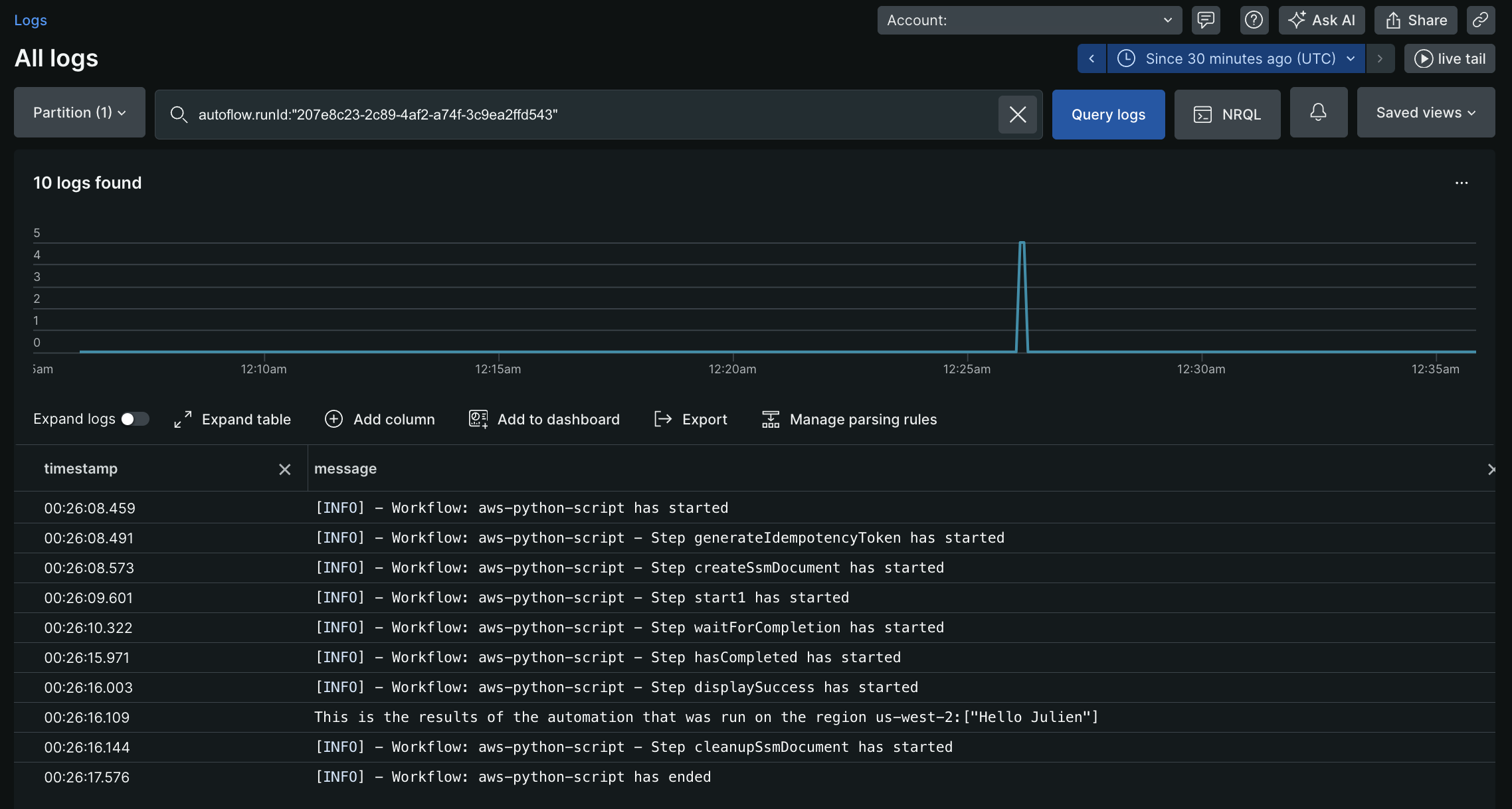
例3: より複雑なSSMドキュメント
- API ゲートウェイ REST API のリストを取得します。私の API (
Test API) をフィルターし、残りの API ID を取得します。 - 私の API (
Test API) 内のすべてのリソースのリストを取得します。pathPart(/test)に基づいて特定のリソースをフィルタリングし、リソースIDを取得します - Lambda関数 (
ApiGwTestFn) のバージョンのリストを取得します。 ロールバックする特定のバージョン (バージョン: 1) をフィルターし、そのバージョンの functionArn を取得します。 - 上記の手順で取得したラムダ関数Arnを使用してAPIゲートウェイ統合を更新します。
- REST API (
Test API) の新しいデプロイメントを作成します。
schemaVersion: '0.3' description: Test SSM for API gateway rollback mainSteps: - name: ExecuteAwsApi action: aws:executeAwsApi nextStep: ExecuteGetApiResources inputs: Service: apigateway Api: GetRestApis outputs: - Name: resultApiId Selector: $.items[?(@.name=='Test API')].id Type: String - name: ExecuteGetApiResources action: aws:executeAwsApi nextStep: ExecuteListVersionsByFunction inputs: Service: apigateway Api: GetResources restApiId: '{{ ExecuteAwsApi.resultApiId }}' outputs: - Name: resultResourceId Selector: $.items[?(@.pathPart=='test')].id Type: String - name: ExecuteListVersionsByFunction action: aws:executeAwsApi nextStep: ExecuteApiGwUpdateIntg inputs: Service: lambda Api: ListVersionsByFunction FunctionName: ApiGwTestFn outputs: - Name: resultLambdaVersionArn Selector: $.Versions[?(@.Version=='1')].FunctionArn Type: String - name: ExecuteApiGwUpdateIntg action: aws:executeAwsApi nextStep: ExecuteApiGwCreateDeployment inputs: Service: apigateway Api: UpdateIntegration restApiId: '{{ ExecuteAwsApi.resultApiId }}' resourceId: '{{ ExecuteGetApiResources.resultResourceId }}' httpMethod: GET patchOperations: - op: replace path: /uri value: arn:aws:apigateway:us-east-2:lambda:path/2015-03-31/functions/{{ ExecuteListVersionsByFunction.resultLambdaVersionArn }}/invocations - name: ExecuteApiGwCreateDeployment action: aws:executeAwsApi inputs: Service: apigateway Api: CreateDeployment restApiId: '{{ ExecuteAwsApi.resultApiId }}' outputs: - ExecuteGetApiResources.resultResourceId - ExecuteListVersionsByFunction.resultLambdaVersionArnサンプル SSM はExecuteGetApiResources.resultResourceIdとExecuteListVersionsByFunction.resultLambdaVersionArnを出力します。これらの出力は、ワークフロー定義の以降のステップで使用できます。
このアクションは、アクション入力で渡された認証情報に基づいて、AWS アカウント内の AWS SSM ドキュメントを削除します。AWS Systems Manager のドキュメントを参照してください
入力フィールド | オプション性 | タイプ | 例 |
|---|---|---|---|
awsRoleArn | オプション | 弦 |
|
awsAccessKeyId | 必須 | 弦 |
|
awsSecretAccessKey | 必須 | 弦 |
|
awsSessionToken | オプション | 弦 |
|
リージョン | 必須 | 弦 |
|
documentName | 必須 | 弦 |
|
セレクター | オプション | リスト |
|
出力フィールド | タイプ | 例 |
|---|---|---|
documentName | 弦 |
|
成功 | ブール値 |
|
エラーメッセージ | 弦 |
|
重要
- アクション入力では、
awsAccessKeyIdとawsSecretAccessKeyのみを指定できますが、これらは IAM ユーザーの静的認証情報である必要があります。 - セッション資格情報を使用する場合は、
awsAccessKeyId、awsSecretAccessKey、およびawsSessionTokenアクション入力に渡す必要があります。 - 指定された唯一のものを出力として取得するセレクター。
すべての Lambda関数をリストする単純な SSM ドキュメント
schemaVersion: '0.3' description: List all Lambda function names. mainSteps: - name: ExecuteAwsApi action: aws:executeAwsApi isEnd: true inputs: Service: lambda Api: ListFunctions outputs: - Name: resultFunctionName Selector: $..FunctionName Type: StringList outputs: - ExecuteAwsApi.resultFunctionNameSSM による完全なワークフロー定義:
name: aws-api
  workflowInputs:    key:      type: String      defaultValue: "${{ :secrets:11933347:USERNAME_AWS_ACCESS_KEY_ID }}"    access:      type: String      defaultValue: "${{ :secrets:11933347:USERNAME_AWS_SECRET_ACCESS_KEY }}"    token:      type: String      defaultValue: "${{ :secrets:11933347:USERNAME_AWS_SESSION_TOKEN }}"    region:      type: String      defaultValue: us-east-2
  steps:    - name: createSsmDocument      type: action      action: aws.systemsManager.writeDocument      version: 1      inputs:        awsAccessKeyId: ${{ .workflowInputs.key }}        awsSecretAccessKey: ${{ .workflowInputs.access }}        awsSessionToken: ${{ .workflowInputs.token }}        region: ${{ .workflowInputs.region }}        selectors:          - name: documentName            expression: '.documentName'          - name: documentType            expression: '.documentType'          - name: documentStatus            expression: '.documentStatus'          - name: success            expression: '.success'        documentName: "LambdaListFunctionNames"        documentContent: |          schemaVersion: '0.3'          description: List all Lambda function names.          mainSteps:            - name: ExecuteAwsApi              action: aws:executeAwsApi              isEnd: true              inputs:                Service: lambda                Api: ListFunctions              outputs:                - Name: resultFunctionName                  Selector: $..FunctionName                  Type: StringList          outputs:            - ExecuteAwsApi.resultFunctionName
    - name: generateIdempotencyToken      type: action      action: utils.uuid.generate      version: 1
    - name: start1      type: action      action: aws.systemsManager.startAutomation      version: 1      inputs:        awsAccessKeyId: ${{ .workflowInputs.key }}        awsSecretAccessKey: ${{ .workflowInputs.access }}        awsSessionToken: ${{ .workflowInputs.token }}        region: ${{ .workflowInputs.region }}        documentName: "${{ .steps.createSsmDocument.outputs.documentName }}"        idempotencyToken: ${{ .steps.generateIdempotencyToken.outputs.uuid }}
    - name: waitForCompletion      type: action      action: aws.systemsManager.waitForAutomationStatus      version: 1      inputs:        awsAccessKeyId: ${{ .workflowInputs.key }}        awsSecretAccessKey: ${{ .workflowInputs.access }}        awsSessionToken: ${{ .workflowInputs.token }}        region: ${{ .workflowInputs.region }}        automationExecutionId: ${{ .steps.start1.outputs.automationExecutionId }}        # Optional, default is Success and Failed        automationExecutionStatuses:          - "Success"          - "Failed"        timeout: 60
    - name: hasCompleted      type: switch      switch:        - condition: ${{ .steps.waitForCompletion.outputs.automationExecutionStatus == "Failed" }}          next: displayError        - condition: ${{ .steps.waitForCompletion.outputs.automationExecutionStatus == "Success" }}          next: displaySuccess      next: displayUnexpected
    - name: displayUnexpected      type: action      action: newrelic.instrumentation.log      version: 1      inputs:        message: "Unexpected status ${{ .steps.waitForCompletion.outputs.automationExecutionStatus | tojson }}"      next: cleanupSsmDocument
    - name: displaySuccess      type: action      action: newrelic.instrumentation.log      version: 1      inputs:        message: "This is all the lambda function names on the region ${{ .workflowInputs.region }}:${{ .steps.waitForCompletion.outputs.automationExecutionOutputs.ExecuteAwsApi.resultFunctionName | join(\",\") }}"      next: cleanupSsmDocument
    - name: displayError      type: action      action: newrelic.instrumentation.log      version: 1      inputs:        message: "Error while executing document ${{ .steps.createSsmDocument.outputs.documentName }}, detail: ${{ .steps.waitForCompletion.outputs.errorMessage }}"      next: cleanupSsmDocument
- name: cleanupSsmDocument type: action action: aws.systemsManager.deleteDocument version: 1 inputs: awsAccessKeyId: ${{ .workflowInputs.key }} awsSecretAccessKey: ${{ .workflowInputs.access }} awsSessionToken: ${{ .workflowInputs.token }} region: ${{ .workflowInputs.region }} documentName: ${{ .steps.createSsmDocument.outputs.documentName }}AWS SSM ドキュメントを使用して自動化を開始します。AWS Systems Manager のドキュメントを参照してください
入力フィールド | オプション性 | タイプ | 例 |
|---|---|---|---|
awsRoleArn | オプション | 弦 |
|
awsAccessKeyId | オプション | 弦 |
|
awsSecretAccessKey | オプション | 弦 |
|
awsSessionToken | オプション | 弦 |
|
リージョン | 必須 | 弦 |
|
documentName | 必須 | 弦 |
|
パラメーター | オプション | 地図 |
|
idempotencyToken | オプション | UUID |
これは、AWS ssm 自動化を開始するための冪等性のためにクライアントとして渡されます。 |
セレクター | オプション | リスト |
|
出力フィールド | タイプ | 例 |
|---|---|---|
automationExecutionId | 弦 |
|
成功 | ブール値 |
|
エラーメッセージ | 弦 |
|
重要
- アクション入力で
awsAccessKeyIdとawsSecretAccessKeyを指定する場合、それらが IAM ユーザーの静的認証情報であることを確認してください。 - セッション資格情報を使用する場合は、
awsAccessKeyId、awsSecretAccessKeyおよびawsSessionTokenアクション入力に渡す必要があります。 - 手順については、 AWS 認証情報を参照してください。
- セレクターを使用して、指定されたもののみを出力として取得します。
ワークフロー定義 | 入力 | 出力 |
|---|---|---|
| | |
AWS ドキュメントを使用した自動化を待機します。詳細については、 AWS Systems Manager のドキュメントを参照してください。
入力フィールド | オプション性 | タイプ | 例 |
|---|---|---|---|
awsRoleArn | オプション | 弦 |
|
awsAccessKeyId | オプション | 弦 |
|
awsSecretAccessKey | オプション | 弦 |
|
awsSessionToken | オプション | 弦 |
|
リージョン | 必須 | 弦 |
|
automationExecutionId | 必須 | 弦 |
完了を待つ必要がある自動化
。 |
automationExecutionStatuses | オプション | リスト |
待機を停止できるAutomationExecutionからの自動化実行ステータスのリスト。 デフォルト: |
タイムアウト | オプション | int |
自動化ステータスが予想される タイムアウトが発生した場合、出力には |
セレクター | オプション | リスト |
。 |
出力フィールド | タイプ | 例 |
|---|---|---|
automationExecutionId | 弦 |
|
automationExecutionStatus | 弦 |
アクションが成功した場合、 それ以外の場合、これは null になります。 |
automationExecutionOutputs | 地図 | 出力は、ドキュメントからの出力値のマップになります。ドキュメント内のすべての出力は、この出力フィールドを使用して収集でき、ワークフロー自動化定義の後続のステップで使用できます。 |
成功 | ブール値 |
|
エラーメッセージ | 弦 |
|
重要
- アクション入力では、
awsAccessKeyIdとawsSecretAccessKeyのみを指定できますが、これらは IAM ユーザーの静的認証情報である必要があります。 - セッション資格情報を使用する場合は、
awsAccessKeyId、awsSecretAccessKeyおよびawsSessionTokenアクション入力に渡す必要があります。 - AWS 認証情報を設定する手順を参照してください。
- セレクターを使用して、指定されたもののみを出力として取得します。
ワークフロー定義 | 入力 | 出力 |
|---|---|---|
| | |