preview
We're still working on this feature, but we'd love for you to try it out!
This feature is currently provided as part of a preview program pursuant to our pre-release policies.
As a New Relic user, you may need to analyze your telemetry data alongside data stored across multiple databases, data warehouses, and spreadsheets. Manually exporting data from each source and combining it with your observability data offline takes time and reduces productivity. Additionally, you often can't consolidate all data into a single database due to compliance, security, or operational requirements.
New Relic Lens addresses these challenges. Lens is a unified query platform within New Relic that lets you connect and query multiple data sources directly from New Relic. Write a query in Lens using ANSI SQL and perform cross-database joins to analyze and correlate data from various sources. Lens pushes computational work to each data source, which processes its portion of the query and returns only the results. Lens then combines these results, minimizing data transfer and maintaining security by never ingesting raw data from your external sources.
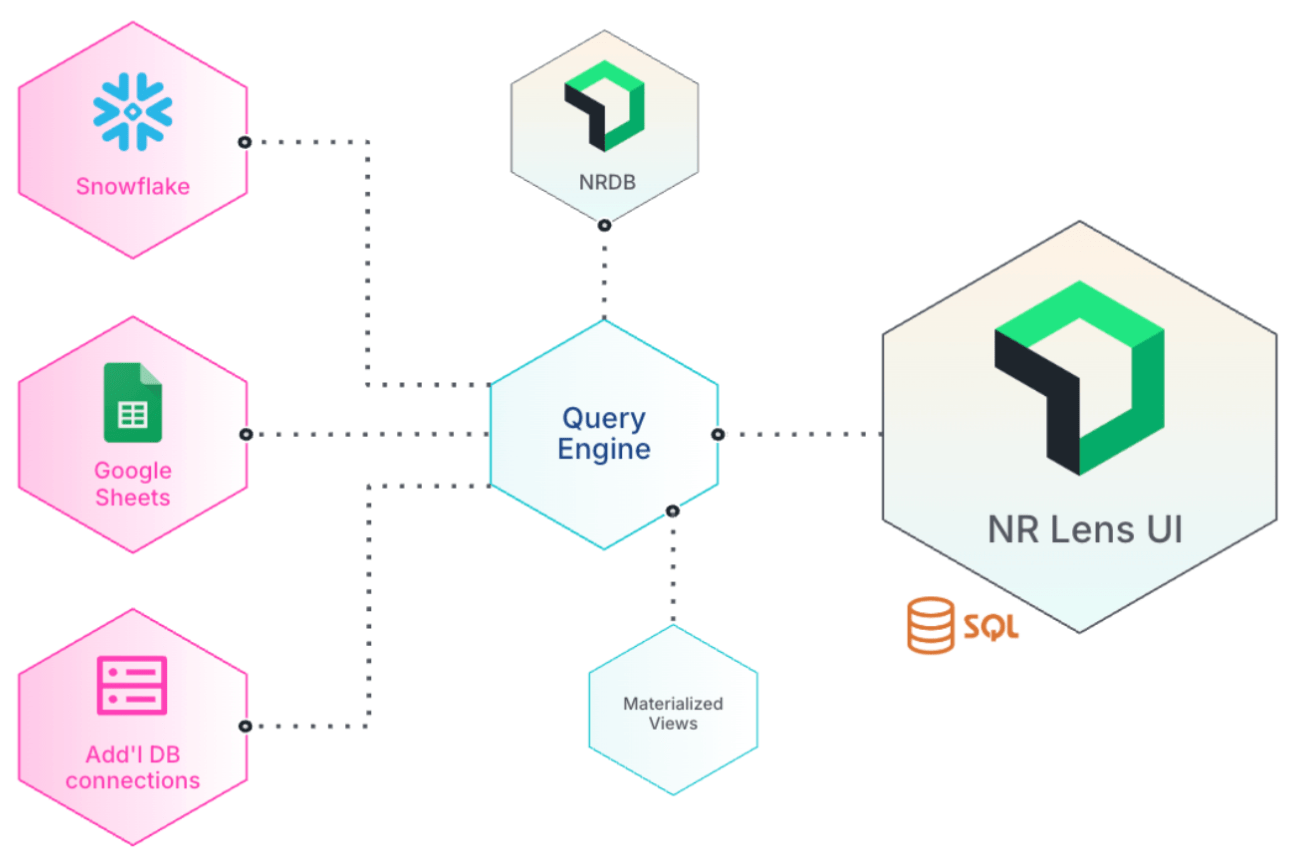
How it works
Using Lens involves the following steps:
Enable Lens
Lens is available as a public preview. Check with your Organization Manager to opt in from the Previews & Trials page.
Check permissions
If you are an Organization Manager, you have the necessary permissions to access all Lens features by default. If you're not an Organization Manager, reach out to your Authentication Domain Manager to create a custom role with the required permissions.
Set up connectors
Lens includes built-in system connectors for NRDB data. With necessary permissions, you can set up data connectors to connect to external data sources:
- Cloud data warehouses: Snowflake, Redshift, ClickHouse
- Relational databases: PostgreSQL, MySQL, SQL Server
- Document databases: MongoDB, Elasticsearch
- Spreadsheets: Google Sheets
- Data lakes: Iceberg
- Metrics and monitoring: Prometheus, AWS CloudWatch
Query data
Write SQL queries in the Query Builder, Notebooks, or custom dashboards using the format connection_name.schema.table to reference tables and join data across sources.
Create materialized views (optional)
For complex queries that run frequently, you can save results as materialized views to reduce costs and improve performance.
Use cases
Lens enables various data analysis scenarios:
- Budget analysis: Compare New Relic utilization data from NRDB with budget data stored in Snowflake to track spending against allocated budgets.
- Workflow optimization: Replace multiple manual export/import steps (from one database to another) with a single SQL query that joins all necessary data, reducing costs and improving efficiency.
- Aggregate data across regions: Track user traffic across various geographical regions by unioning data from different data sources.
- Performance optimization with materialized views: An executive dashboard combines data from 5+ databases and refreshes weekly. By storing the results from the multi-database
JOINquery in a materialized view, you avoid running the computationally expensive query each time someone loads the dashboard. This reduces query costs and significantly improves page load speed.
Where you can use Lens
You can use Lens in the following areas of the New Relic platform:
- Query Builder: Write and execute SQL queries directly in the query builder.
- Notebooks: Create SQL blocks in notebooks to combine queries with visualizations and markdown documentation.
- Customer Dashboards: Add SQL-based charts to your private dashboards.
重要
SQL-based charts aren't supported in public dashboards.
User roles and permissions
Connector and materialized view access are controlled by specific RBAC permissions. Users with the Organization Manager role have all Lens related RBAC permissions by default.
For other users, the Authentication Domain Manager needs to create an organization-scoped custom role via NerdGraph with the required Lens permissions. When creating the role, add the permission IDs from the tables below to the permissionIds array.
Connector permissions
The following permission IDs control access to Lens connectors:
Permission ID | Description |
|---|---|
| View connectors and their details |
| Create new connectors |
| Edit existing connectors |
| Delete connectors |
| Query data from connectors |
Materialized view permissions
The following permission IDs control access to materialized views:
Permission ID | Description |
|---|---|
| View materialized views |
| Create materialized views |
| Edit materialized views |
| Refresh materialized views |
| Delete materialized views |
Fine-grained access control
In addition to RBAC permissions, you can configure fine-grained access control for individual connectors. For details, see Connector access control.